

Microsoft Entra ID is Microsoft’s cloud-based identity and access management service. It decides who can sign in to your applications, devices and data, and under what conditions. It is the new name for Azure Active Directory (Azure AD), and if your business uses Microsoft 365, you already have it, whether or not anyone has ever configured it deliberately.
In this guide we explain what Entra ID does, what changed when Azure AD was renamed, how it differs from on-premises Active Directory, how the two work together, and how to tell what state your own computers are in. We write it for business owners, IT managers and operations teams in Ireland who want to make sound decisions without wading through vendor documentation.
TL;DR
- Microsoft Entra ID is a cloud identity and access management service, and it is the same product that was previously called Azure AD.
- Every Microsoft 365 tenant is automatically an Entra tenant, so most Irish businesses on Microsoft 365 are already using it.
- Entra ID is not a cloud copy of Windows Server Active Directory. The two can run side by side and be connected, or Entra ID can stand alone.
- Smaller businesses can often use Entra ID as their only directory, while organisations with on-premises servers usually run a hybrid setup.
- You can check whether a Windows PC is Entra joined, hybrid joined or only registered by running one command.
Table of Contents
- What Microsoft Entra ID actually does
- Azure AD renamed Entra ID: what changed and what did not
- Entra ID vs on-premises Active Directory
- How the two work together in a hybrid setup
- Joined, hybrid joined or registered: what the device terms mean
- Is Entra ID right for a small business?
- Our perspective
- How we can help
- FAQ
- Sources
What Microsoft Entra ID actually does
Microsoft describes Entra ID as the foundational product of the Microsoft Entra family, providing authentication, policy enforcement and protection for users, devices, apps and resources. In everyday terms, it is the front door and the doorman for your business systems. It checks that the person signing in is who they say they are, then applies your rules about what that person may open, from which device and in which circumstances.
That last part is where it earns its keep. Entra ID supports adaptive access and risk-based Conditional Access policies as part of a Zero Trust approach. A practical example: a member of your finance team signing in from their usual laptop in Wicklow may go straight through, while the same account signing in from an unfamiliar device in another country can be asked for extra verification or blocked. You set the rules, and the service applies them every time.
The core capabilities most businesses use are:
single sign-on, so one set of credentials opens Microsoft 365 and the other business applications you connect to it; multifactor authentication, which adds a second check to the password; Conditional Access, which sets the conditions for access; and device registration, which ties laptops and phones to your organisation. Each of these is a building block for the others, and together they reduce the damage a stolen password can do.
If you want a closer look at the second of those, our MFA for Microsoft 365 checklist walks through the steps administrators need to follow, and our piece on passwordless authentication covers where sign-in is heading.
You probably already have it
This surprises many of the business owners we speak to. According to Microsoft, every Microsoft 365, Azure or Dynamics CRM Online tenant is automatically a Microsoft Entra tenant. When your staff sign in to Outlook, Teams or SharePoint, they are authenticating against Entra ID. The question for most organisations is therefore not whether to adopt it, but whether it is configured well: who has administrator rights, whether multifactor authentication is enforced, and whether old accounts have been removed.
Because identity now sits in the cloud, it also helps to understand what you should expect from any cloud provider in writing. Reviewing cloud security contract terms before you sign is a sensible habit for any service that handles your staff and customer data.
Azure AD renamed Entra ID: what changed and what did not
Microsoft Entra ID is the new name for the service formerly known as Azure Active Directory. Microsoft made the change in 2023 to unify the Microsoft Entra product family, reflect its multicloud and multiplatform capabilities, and reduce confusion with the on-premises Active Directory product.
The important point for anyone running a live business is that nothing broke. The same Microsoft page confirms that the rename did not interrupt existing deployments, configurations or integrations, and that features, licensing, terms, APIs and login URLs stayed the same. If you are searching for “Entra ID vs Azure AD”, the honest answer is that they are one product with two names. Older articles, scripts, training material and some admin screens may still say Azure AD, and they are still describing the same service.
The naming mattered because “Azure Active Directory” suggested a hosted version of the Active Directory many IT teams had run on their own servers for decades. It is not that, which brings us to the next question.
Entra ID vs on-premises Active Directory
The most common misunderstanding is that Entra ID is simply Active Directory in the cloud. Microsoft is explicit that Entra ID is not a cloud version of Windows Server Active Directory, nor a complete replacement for it. Organisations that use Windows AD can connect it to Entra ID, and Entra ID can also be used independently.
The two do different jobs. Per Microsoft’s comparison, Windows Server Active Directory forms the basis for many on-premises infrastructure components, while Entra ID is the control plane for accessing apps, using Conditional Access to decide which users can reach which apps under which conditions.
| Question | On-premises Active Directory | Microsoft Entra ID |
|---|---|---|
| Where it runs | On your own Windows servers | In Microsoft’s cloud |
| Main purpose | Underpins on-premises infrastructure such as domain-joined machines and file servers | Controls access to apps and cloud resources |
| Typical access control | Domain membership and group policy | Conditional Access, multifactor authentication, single sign-on |
| Who needs it | Businesses with servers and a domain on site | Any business using Microsoft 365 or cloud apps |
| Can it stand alone? | Yes | Yes, for smaller companies especially |
If you are weighing up servers on your premises against hosted ones, our guide to on-premises versus cloud servers sets out the practical considerations. Identity is usually the first piece of that decision, because it determines how everything else is reached.
How the two work together in a hybrid setup
Most established businesses, with file servers, line-of-business software and years of accumulated accounts, do not switch off Active Directory overnight. They connect it to the cloud instead. In a hybrid deployment, users and groups can be synced from on-premises directories such as Windows Server Active Directory to Entra ID, where they become available to Microsoft 365, Azure and other applications.
The tool that handles this is Microsoft Entra Connect. It lets people sign in to cloud and on-premises resources with the same passwords, and with password hash synchronisation it syncs password hashes from on-premises Active Directory to Entra ID.
Choosing how people authenticate
Microsoft lists three hybrid authentication methods supported by Entra Connect: password hash synchronisation, pass-through authentication and federation, for example with AD FS. In plain terms:
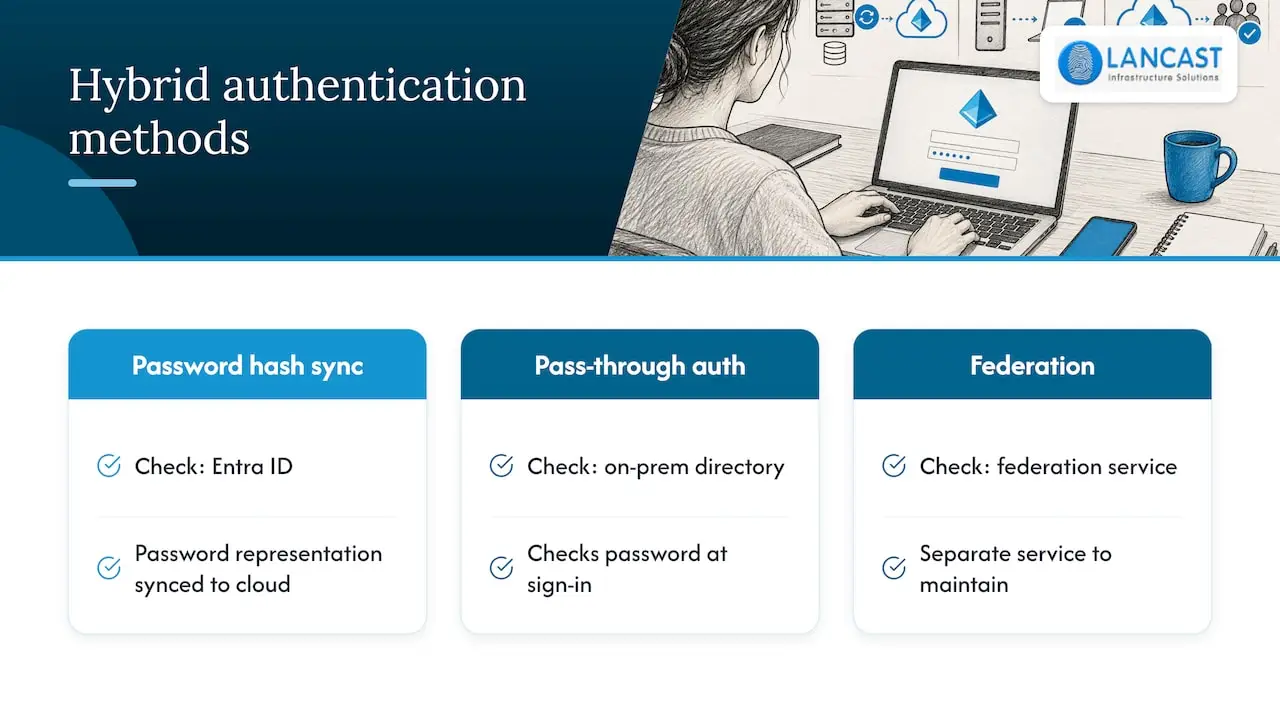
Password hash synchronisation is the simplest. A representation of the password is synchronised to the cloud, and Entra ID does the checking.
Pass-through authentication checks the password against your on-premises directory at the moment of sign-in.
Federation hands the check to a separate federation service you run, which adds components to maintain.
Our recommendation follows Microsoft’s own: even when you choose one of the more involved options, Microsoft recommends deploying password hash synchronisation as a backup for resilience. If your on-premises servers go down, staff can still reach Microsoft 365. That fits neatly with a wider disaster recovery plan, because identity is one of the first things people need when systems return.
Tidy the directory before you connect it
Syncing a messy directory to the cloud simply moves the mess. Stale accounts, unused groups and forgotten service accounts all come along. We would always suggest a review first, and our article on Active Directory cleanup explains a cautious approach that avoids surprise outages.
Joined, hybrid joined or registered: what the device terms mean
This is where the search for “hybrid Azure AD join” usually begins, because the terminology is confusing. Three states matter.
Entra joined. The device is joined directly to the cloud. Microsoft says Entra joined devices let users sign in directly with their Entra account, with single sign-on to both cloud and on-premises resources. Entra join is supported on Windows 10 and 11 (excluding Home editions), certain Windows Server versions, and non-Windows systems such as macOS and Linux. That Home exclusion catches out small businesses that buy consumer laptops, so check the Windows edition before you buy.
Hybrid joined. Microsoft explains that hybrid join registers a device already joined to an on-premises Active Directory domain in Entra ID. In a managed environment, Entra Connect synchronises information from the computer object so a device object can be created in the cloud. It suits organisations that still have domain-joined machines and are not ready to move them.
Registered. This usually describes a personal or bring-your-own device that has been added to the organisation’s identity system without being fully owned by it.
Microsoft also gives guidance on sign-in experience: use Entra joined or hybrid joined devices where possible, and where Windows devices cannot be joined, use seamless single sign-on with password hash synchronisation to remove needless prompts.
How to check a computer’s status
On a Windows PC, open a command prompt and run dsregcmd /status. Microsoft’s guidance says that AzureAdJoined and DomainJoined values identify the joined and hybrid joined states, and registration appears as WorkplaceJoined in the user state section. A PC showing AzureAdJoined as YES and DomainJoined as NO is cloud joined. Both as YES means hybrid joined. If you are rolling out many machines, the same thinking applies to Windows Autopilot deployment, and to device management through Microsoft Intune.
Is Entra ID right for a small business?
For many small Irish businesses, yes, and it is already in place. Microsoft notes that smaller companies can use Entra ID as their only directory service to control access to applications and SaaS products. If you have no on-premises servers, you may never need Active Directory at all.
The sensible way to approach it is by starting position:
Cloud only, with Microsoft 365 and no servers. Use Entra ID as your sole directory. Focus on enforcing multifactor authentication, limiting administrator accounts and managing devices.
A server on site and a handful of staff. Consider whether the server still earns its place. Our guide to Microsoft 365 migration for growing businesses describes how that transition tends to run.
A mature domain with legacy applications. Stay hybrid. Sync with Entra Connect, add password hash synchronisation as a safety net, and plan a gradual move.
Whichever applies, protect the data that lives in the tenant. Identity controls who gets in, but it is not a backup, which is why we also point clients to choosing a Microsoft 365 backup solution.
Our perspective
We have supported Irish organisations for 30 years, and the pattern we see with Entra ID is consistent. The technology is rarely the obstacle. The obstacle is that identity was set up in a hurry when Microsoft 365 was first switched on, and nobody has looked at it since.
Our advice is to treat identity as the foundation of your security rather than an administrative detail. Decide who should have access to what, enforce multifactor authentication for everyone, keep administrator accounts to a minimum, and make sure every laptop you buy can be joined to your tenant. These are modest steps that make a large difference to how exposed you are.
As a Microsoft Cloud Service Provider, we configure and manage these settings alongside the rest of your environment, so identity, devices, email and backup are designed together instead of being handled by separate hands. Our aim is to act as an extension of your own team, keeping the work proactive so that your staff can concentrate on the business.
Carl
How we can help
If you would like Entra ID reviewed, connected to an existing Active Directory, or set up from scratch as part of a move to Microsoft 365, our team can take care of it. We work with small businesses, growing firms and larger organisations across Ireland, covering the identity configuration, device enrolment, security settings and the ongoing support afterwards.

To talk through your situation, explore our Microsoft 365 and cloud services and IT consultancy, or see how our managed IT services for small businesses keep identity, devices and support working together. If security is the priority, our IT security services are a good place to start.
FAQ
What is Microsoft Entra ID?
It is Microsoft’s cloud-based identity and access management service, providing authentication, policy enforcement and protection for users, devices, apps and resources. It is what your staff sign in against when they use Microsoft 365. It is the same service that was formerly called Azure AD.
Is Entra ID the same as Azure AD?
Yes. Microsoft renamed Azure Active Directory to Entra ID in 2023, and features, licensing, APIs and login URLs stayed the same. Any guidance written for Azure AD still describes the same product, although some menu labels and terms have been updated.
Does Entra ID replace on-premises Active Directory?
Not necessarily. Microsoft states that Entra ID is not a complete replacement for Windows Server Active Directory. You can connect the two, or use Entra ID alone if you have no on-premises need for a domain. The right choice depends on the applications and servers you still run.
How do I tell if a computer is Entra joined?
Run dsregcmd /status in a command prompt. AzureAdJoined and DomainJoined values show whether the device is joined or hybrid joined, and WorkplaceJoined shows a registered device. Windows Home editions cannot be Entra joined, so confirm the edition if the option is missing.
Do I need Entra ID if I am a small business?
If you use Microsoft 365, you already have it, because every Microsoft 365 tenant is automatically an Entra tenant. What matters is how well it is set up, including multifactor authentication and administrator access.
Sources
- What is Microsoft Entra?
- Microsoft Entra ID (formerly Azure AD), Microsoft Security
- New name for Azure Active Directory
- What is Microsoft Entra ID?
- Compare Active Directory to Microsoft Entra ID
- Microsoft Entra Cloud Governed Management for On-Premises
- Microsoft Entra Connect: User sign-in
- Authentication for Microsoft Entra hybrid identity
- What is a Microsoft Entra joined device?
- Join Windows 11 devices to Microsoft Entra ID during OOBE
- How Microsoft Entra device registration works
- Troubleshoot devices by using the dsregcmd command
- Cloud contact centre security contract terms