

A router and a firewall are not the same thing. A router connects networks and sends traffic to its destination, while a firewall inspects that traffic and blocks what should not get through. Most business networks need both functions, and in many offices they sit in one box. What matters is that the security function is properly configured, kept up to date and suited to the size of your business.
TL;DR
- A router forwards data between networks, such as your office and the internet. A firewall applies security rules to decide what is allowed in and out.
- Many routers include basic firewall features, and next-generation firewalls can include routing, so one device can sometimes do both jobs.
- Irish guidance from the NCSC recommends boundary firewalls as a baseline for every organisation, however small.
- A growing business, one with remote staff or one handling sensitive data usually benefits from a dedicated, managed firewall.
- We can design, install and monitor both for you, so the setup suits how you work.
Table of Contents
- What a router does
- What a firewall does
- Firewall vs router: the differences side by side
- Can a router be used as a firewall?
- Can a firewall replace a router?
- What Irish guidance says about firewalls
- Which one does your business need?
- Setting up both properly
- Our perspective
- How LANCAST can help
- FAQ
- Sources
What a router does
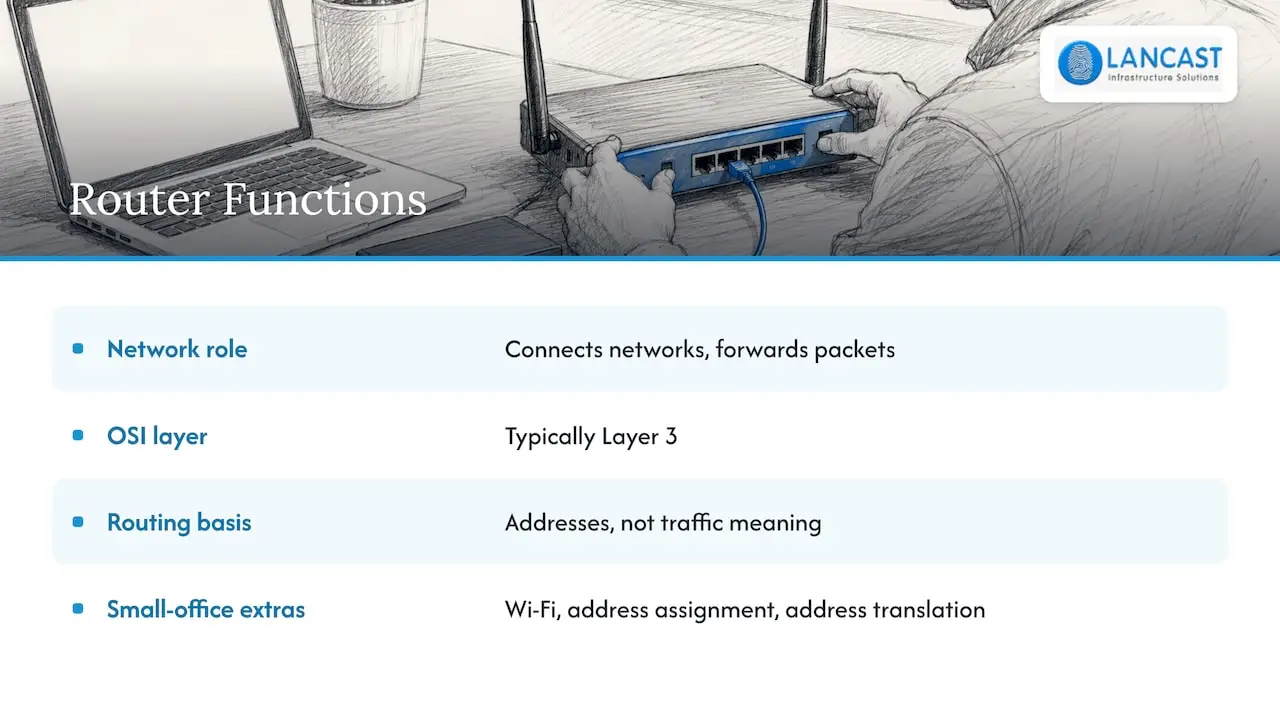
A router is the device that joins your office network to other networks, most obviously the internet. According to Check Point Software, a router routes data between source and destination, typically at Layer 3 (the network layer) of the OSI model, and its purpose is to connect different networks and forward packets.
In practical terms, when a laptop in your office asks for a web page, the router works out where to send that request and brings the reply back to the right machine. It looks at addresses, not at what the traffic means. Its job is efficient delivery.
In a small office the router supplied by your broadband provider usually also provides Wi-Fi, hands out addresses to devices and translates your internal addresses into the public one. That convenience is why many people assume it also protects them fully. It does some of that work, but protection is not what it is built around.
What a firewall does
A firewall sits at the boundary of a network and monitors and filters traffic according to security rules. GeeksforGeeks notes that firewalls keep a state table to track information about each connection flow, which is part of what separates them from standard routers that concentrate on getting packets along the best path.
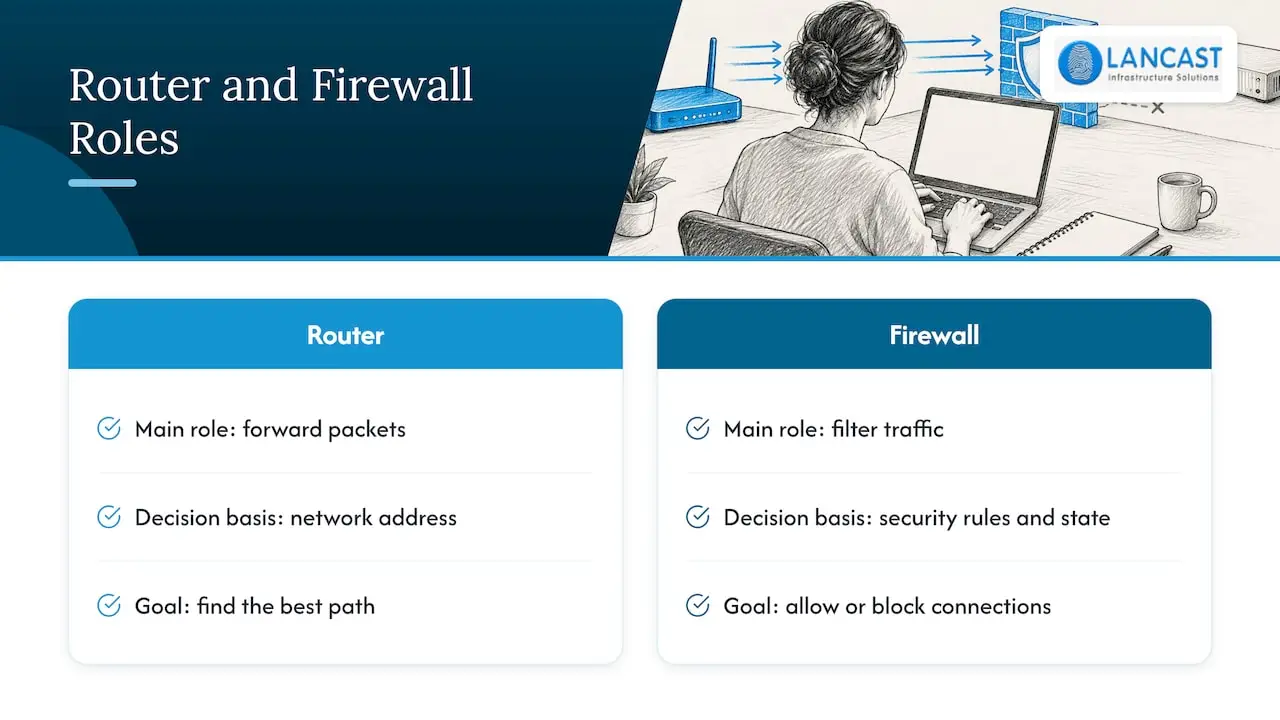
Put simply, a firewall asks whether a connection should be allowed at all. It can permit your staff to browse the web while refusing unsolicited connections from the internet, block traffic to risky ports and log what it has stopped. More capable firewalls inspect traffic at higher levels, not just by address and port. Our page on business firewall features explains what to look for.
Firewall vs router: the differences side by side
| Question | Router | Firewall |
|---|---|---|
| Main purpose | Connects networks and forwards traffic | Protects the network by allowing or blocking traffic |
| Designed first for | Routing packets | Security control |
| How it decides | Destination addresses and the best path | Security rules, connection state and, on advanced models, content |
| Typical position | Between your network and your internet provider, or between internal networks | At the network boundary, and sometimes between internal zones |
| Logging and visibility | Basic | Detailed, designed for security review |
| Can it do the other’s job? | Only simple filtering | Next-generation models can include routing |
The Digital Policy Office in Hong Kong describes routers as network devices with value-added security features, and recommends installing firewalls at network junctions where data flow needs to be examined, restricted, filtered or redirected. That is a helpful way to think about it: the router’s security features are an extra, while for a firewall they are the whole point.
Can a router be used as a firewall?
To a degree. Most business routers can block unsolicited inbound connections and apply simple rules. For a very small office with few devices and little sensitive data, that gives a starting level of protection, and the NCSC’s advice to Irish businesses includes turning on firewalls as one of its basic protections.
There are limits to leaning on routing equipment alone. Access control lists on routers and switches can complement network security, but Jisc explains they are not a replacement for a firewall: they provide simple packet blocking, have limited logging and flexibility, and cannot inspect packets at higher levels. Jisc also notes that they add processing load that can reduce router performance compared with a dedicated firewall appliance.
So the honest answer is that a router with a firewall feature switched on is a good first layer, and a purpose-built firewall is the right tool once your business depends on its network being both available and defended.
Can a firewall replace a router?
Often yes. Check Point states that next-generation firewalls can incorporate networking and routing functions, and so can replace a standalone router at the network boundary. That is why many modern offices run a single firewall appliance connected to the broadband or fibre line, with switches and wireless access points behind it.
This approach has clear benefits: one device to configure, patch and monitor, one set of logs, and security rules that apply to routing decisions from the start. If your provider’s modem or router must stay in place, it can be set to pass traffic through to your firewall so that the firewall handles the security policy.
What Irish guidance says about firewalls
The NCSC, Ireland’s national cyber security centre, is consistent on this. Its 12 Steps to Cyber Security recommends establishing basic perimeter and network security using firewalls, internet proxies and network segmentation. It adds that smaller businesses, or those just starting to address cyber risk, can focus first on basic protections that include boundary firewalls, and that these essentials are a minimum baseline for any organisation.
Three further points from NCSC material are worth applying:
- Its ingress and egress filtering guidance recommends a default deny strategy for perimeter firewall rules, permitting only the minimum inbound traffic the network requires.
- The same guidance notes that the internet access router sits outside the perimeter firewall, so measures should prevent unauthorised access to it, including appropriate protection if SNMP is enabled.
- For organisations in scope of NIS 2, the NCSC’s draft risk management measures guidance says controls such as firewalls should protect internal network domains from unauthorised access and that systems should be segmented into zones based on functional or security relationships.
The second point is a useful reminder that even where you keep a separate router, it is still an exposed device and needs its own care: strong administrator credentials, current firmware and no unnecessary management services open to the internet.
Which one does your business need?
The choice is rarely router or firewall. It is usually whether the firewall function is built into the router, built into a combined appliance, or handled by a dedicated device.
A very small office or sole trader
A router with its firewall enabled, current firmware and a changed default password is a reasonable start, together with antivirus and backups. As soon as you hold client records, financial data or work from home regularly, consider stepping up.
A growing business of 10 to 100 people
This is where a dedicated business firewall pays for itself. You get proper logging, rules by user group, secure remote access and the option to separate guest Wi-Fi, printers and servers from staff devices. Our guide to network segmentation shows what that separation achieves in practice, and the Facility Zoning for Networks guide gives a useful overview of how zones relate to firewalls.
Multi-site or regulated organisations
If you are a medium enterprise, run several sites or fall under NIS 2 or sector rules, you will want next-generation firewalls managed centrally, with routing, VPNs and segmentation planned from the outset, and a monitoring service watching the logs.
Setting up both properly
Whatever you choose, the following steps make the biggest difference.
- Map your network first. List the internet connections, switches, Wi-Fi, servers, printers and remote users. You cannot write good rules for a network you have not drawn.
- Start with default deny. Allow only the traffic your business needs, as the NCSC recommends.
- Segment. Keep guest Wi-Fi, printers, servers and staff PCs apart. Our switch guide explains the switching side of that.
- Lock down management access. Administration should come from a dedicated, separate network where possible, which the NCSC’s NIS 2 draft guidance also recommends.
- Keep firmware current and review rules. Old rules for retired services are a common weakness.
- Monitor and test. Logs only help if someone reads them, and a penetration test shows how the setup stands up from outside.
The cabling and switching under all of this matter too. A well-planned network installation, covered in our network design and installation services, makes segmentation far easier to deliver.
Our perspective
In our experience, the firewall versus router question is really a question about who is responsible for security on your network. A router supplied with a broadband line is built to get you online. A firewall is built to decide what is allowed once you are there.
With 30 years of experience, we have seen the strongest results when businesses treat the firewall as part of a managed service rather than a box in a cupboard. Rules are reviewed, firmware is updated, logs are watched and changes are planned, so security keeps pace with the business instead of being set once and forgotten.
As an HP Amplify Partner and Microsoft Cloud Service Provider, we design networks that fit into your existing systems, whether that means a single firewall for a small office or a segmented, multi-site design for a larger organisation. We aim to act as an extension of your own team.
Carl
How LANCAST can help
We provide network design, cabling, firewall and security services, together with proactive monitoring and onsite or remote support for businesses across Ireland. Whether you need a single new firewall, a full network refresh or ongoing management, our managed services are available in Silver, Gold and Platinum Support levels, and we are happy to talk through which fits.

To discuss your network, contact us through lancast.ie and we will help you decide what your business needs.
FAQ
Is a firewall the same as a router?
No. A router connects networks and forwards traffic, while a firewall applies security rules to allow or block it. The two functions can share one device, but they are different jobs.
Can a router be used as a firewall?
A router can provide basic filtering, and enabling its firewall is sensible. For stronger inspection, detailed logging and more flexible rules, a dedicated firewall is the better fit as your business grows.
Should I enable the firewall on my router?
Yes. The NCSC advises Irish businesses to turn on firewalls as one of their basic protections. Keep the router’s firmware updated and avoid exposing its management interface to the internet.
Can a firewall replace my router?
A next-generation firewall can include routing and replace a standalone router at the network boundary. Your internet provider’s equipment may still be needed to terminate the line, so the two are configured to work together.
Sources
- Router vs. Firewall, Check Point Software
- Difference between Router and Firewall, GeeksforGeeks
- Practice Guide for Internet Gateway Security, Digital Policy Office
- SMECORE Advice, NCSC Ireland
- Firewall implementation at Janet-connected organisations, Jisc
- 12 Steps to Cyber Security, NCSC Ireland
- Ingress & Egress Filtering, NCSC Ireland
- NIS 2 Risk Management Measures Guidance (draft), NCSC Ireland
- Facility Zoning for Networks: A 2026 IT Pro Guide