
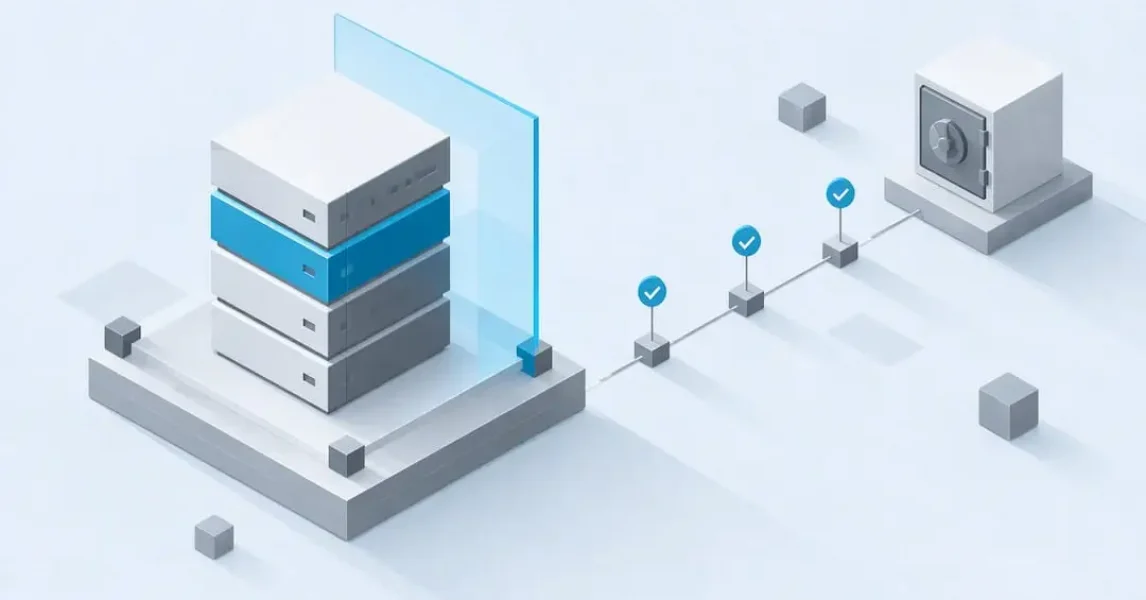
An immutable backup is a copy of your data that cannot be altered, encrypted or deleted for a set retention window, even by someone with administrative access. That guarantee is what makes it one of the most reliable defences against ransomware: attackers can compromise credentials, encrypt live systems and try to destroy your backups, but a properly configured immutable copy simply will not respond to a delete or modify command until the clock runs out.
TL;DR:
- Immutability must be enforced at the storage layer through verified policies, not just supported by the hardware or software capability.
- Retention windows should be aligned with attack dwell time and not left at vendor defaults, to prevent expiration before breach detection.
- Governance mode can be overridden by privileged accounts, so compliance mode is recommended for critical backups to prevent unauthorized modifications.
- Offline, air-gapped copies offer the highest security but require manual handling and slower recovery, often complemented by fast online immutable backups.
- Regular restore tests and ongoing policy verification are essential to ensure that backups remain recoverable and truly protected over time.
Table of Contents
- What makes a backup immutable
- How immutable backups are enforced in practice
- What immutability protects against, and where it falls short
- Building an immutable backup policy that actually holds up
- Managing cost, retention and monitoring over time
- A practical route from policy to verified protection
- Immutability is necessary, but it is not the whole strategy
- How LANCAST supports immutable backup projects
- Sources
- FAQ
What makes a backup immutable
Immutability means a specific copy of your data cannot be changed or removed for a defined retention period, regardless of who issues the command. That single property separates immutable backups from every other form of protection, because it removes the “delete the backup first” step that ransomware operators rely on before encrypting production systems.
It helps to separate two things that get conflated constantly: immutable storage as a capability, and an immutable backup as an operational outcome. A storage platform can support object lock or WORM (write once, read many) policies, but that capability only becomes a real immutable backup when the retention policy is actually applied, correctly scoped and verified. Buying a system with “immutability support” does not automatically mean your backups are protected. As one industry explainer on immutable storage puts it, immutability is a system control that must be proven, not a checkbox you tick once and forget.
The retention window itself deserves attention. It is the period during which the backup cannot be touched, and it needs to be set with intent rather than left at a vendor default. Too short a window and the backup expires before you have even noticed a breach; too long and storage costs climb without adding proportional protection.
Then there is the governance versus compliance distinction, which matters more than most procurement conversations give it credit for. Governance mode allows a user with elevated privileges to override or shorten the retention lock. Compliance mode does not, not even for an account root user, until the retention period expires. For organisations planning against a compromised administrator account, that difference is the entire point. According to guidance on Azure Blob Storage’s immutable storage, time-based retention and legal-hold policies can be applied at the container level or the individual version level, each with its own locking behaviour and interaction with soft delete.
If your backup strategy assumes governance mode is “good enough”, you are betting that no attacker will ever obtain administrative credentials. Given how ransomware groups routinely escalate privileges before touching backup infrastructure, that is not a safe assumption for data you consider critical.
How immutable backups are enforced in practice
Immutability is implemented at several layers, and the strength of your protection depends on which layer actually enforces the rule. A policy set only at the application level can often be reversed by someone with the right permissions; a policy enforced beneath the storage API is far harder to bypass.
Object storage platforms typically offer object lock features, such as Amazon S3 Object Lock, which apply time-based retention or legal holds to individual objects or versions. Microsoft’s documentation on Azure immutable storage describes both container-level and version-level WORM policies, along with specific rules for minimum and maximum retention periods and how they interact with replication and soft delete. These details matter because a misapplied policy scope, locking a container instead of specific versions, for example, can leave gaps that only show up during an actual recovery attempt.
On the backup software side, vendors build their own enforcement mechanisms on top of that storage capability. Veeam’s documentation on hardened repositories and backup repositories describes governance-mode immutability, read-only object storage repository access for secondary servers, and guardrails on cloud vault configurations designed to prevent accidental cost overruns.
A few mechanisms recur across most serious implementations:
- Time-based retention and legal hold: locks an object against deletion until a set date, or indefinitely under active legal hold.
- Hardened repositories: purpose-built Linux repositories that block direct file-system access to backup data, reducing the attack surface even before object lock is applied.
- Four-eyes approval: requires a second authorised person to approve any change to retention settings, closing the single-compromised-account gap.
- Air-gapped or offline copies: physically or logically disconnected media that cannot be reached by network-based attacks at all, at the cost of slower recovery and manual handling.
- Replication and region failover: secondary copies in another region or account, which need their own immutability settings confirmed rather than assumed to inherit the primary’s policy.
Air gapping remains the most conservative option precisely because it removes network reachability altogether, but that assurance comes with real friction: tape rotation, manual handling and slower restore times compared with an online immutable repository. Most organisations end up running a hybrid: fast, immutable online copies for day-to-day recovery, with periodic offline or air-gapped copies as a last-resort layer.
What immutability protects against, and where it falls short
Immutable backups reliably prevent one specific failure mode: an attacker or a rogue insider deleting or encrypting a stored copy during the retention window. That is a meaningful and specific guarantee, and it is why immutability sits at the centre of most modern ransomware recovery plans. CISA’s StopRansomware guide recommends maintaining offline, encrypted backups and using delete protection or object lock in cloud storage as part of a layered ransomware defence.
What it does not do is validate the content of the backup. If ransomware sits undetected inside your network for weeks before triggering, and your backup schedule keeps capturing already-compromised files, immutability will faithfully preserve corrupted data forever. It protects the copy, not the correctness of what is in it.
A few other limits are worth stating plainly:
- Governance-mode bypass: retention locks set to governance mode can be overridden by a sufficiently privileged account, undermining the protection against insider or credential-based attacks.
- Catalogue and index poisoning: if backup metadata or the catalogue itself is corrupted or manipulated, restores can fail even when the underlying immutable data is intact.
- Accidental misconfiguration: a retention policy applied to the wrong container, or set for too short a window, leaves data exposed exactly when it is needed most.
One of the more consistently repeated pieces of national guidance comes from CISA’s ransomware defence advisory, which recommends offline, encrypted backups and delete-protected or immutable cloud storage, while explicitly cautioning that misconfiguration can carry real cost and that immutability does not substitute for other controls. That caveat is doing a lot of work: retention length needs to comfortably exceed typical attacker dwell time, and cost planning needs to account for the fact that longer retention windows mean more storage held for longer, which is a straightforward capacity and budget trade-off rather than a technical one.
Building an immutable backup policy that actually holds up
Designing an immutable backup policy is less about picking a technology and more about setting the right parameters and proving they work. The technology choice, object storage, hardened repository or appliance, matters less than whether the policy is scoped correctly and tested regularly.
- Set retention length against dwell time, not convenience. Attackers frequently sit inside a network for an extended period before triggering an attack, so a retention window shorter than that dwell time defeats the purpose; align retention with your organisation’s own risk tolerance and any regulatory minimums that apply.
- Enforce immutability at the storage layer, not just in software settings. A policy that only exists in backup software configuration can be changed by whoever has access to that console; enforcement beneath the API, as described in Veeam’s guidance on backup immutability, is far harder to unpick.
- Verify immutability across every replica, not just the primary copy. A secondary or cross-region copy does not automatically inherit the same lock settings, and assuming it does is one of the more common gaps found during audits.
- Use compliance mode for your highest-assurance copies. Reserve governance mode, if you use it at all, for data where operational flexibility matters more than protection against a compromised administrator.
- Require a documented approval workflow for any retention change. Four-eyes approval, where a second authorised person must sign off before a policy is loosened, closes the gap that a single compromised account would otherwise open.
- Run restore tests on a fixed schedule, not just after an incident. A backup that has never been restored is a theory, not a plan; scheduled restore drills, referenced in CISA’s StopRansomware guide (PDF), confirm the data is recoverable and the catalogue is intact.
- Keep offline golden images for your most critical systems. These sit outside the immutable online tier entirely, giving you a fallback if something unexpected affects the primary repository.
- Set storage cost guardrails before, not after, deployment. Immutable and archive tiers often carry minimum retention windows and restrictive egress terms, and Veeam’s own documentation on backup repositories notes cloud vault guardrails designed specifically to prevent configurations that trigger unplanned charges.
Pro Tip: Schedule restore tests on a recurring calendar entry rather than an ad hoc basis: the organisations that skip this step are almost always the ones surprised when a “successful” backup will not actually restore.
The step that gets skipped most often is the second-to-last one: golden images. It feels redundant when everything else is already immutable, but a single offline copy of your most critical systems, refreshed periodically and stored apart from your main repository, is the cheapest insurance you will ever buy against a scenario nobody planned for.
Managing cost, retention and monitoring over time
Retention policy is fundamentally a capacity planning decision dressed up as a security setting. Every day you extend a retention window, you are committing to hold that data, plus every subsequent backup within the same window, for longer. Storage growth compounds quickly once you factor in daily incrementals sitting inside a 90 or 180 day lock.
Cloud vault and archive tiers add their own wrinkles. Vendor documentation for Veeam’s backup repositories notes that cloud vault and archive tiers sometimes enforce minimum immutability windows, occasionally 30 or 180 days depending on the tier, and that retrieval or egress terms can restrict how quickly and cheaply you can pull data back out. Those terms need to feature in your cost model before deployment, not after the first invoice arrives.
Soft delete and versioning add another layer worth understanding rather than assuming. Soft delete gives you a recovery window for accidentally deleted objects, but it is not the same as immutability, and the two features interact differently depending on the platform, sometimes extending protection, sometimes creating unexpected retention conflicts.
A handful of metrics are worth tracking on an ongoing basis:
- Storage growth rate, to catch retention settings that are quietly driving costs up faster than anticipated.
- Locked-object counts, confirming that policies are actually being applied where intended rather than only on paper.
- Failed-restore rate, the single clearest signal that something in the chain, catalogue, permissions or storage, needs attention.
None of these numbers matter in isolation. What matters is whether they trend in the direction you expect, and whether a restore test confirms the theory that the numbers suggest.
A practical route from policy to verified protection
Most organisations understand the theory of immutable backups faster than they can implement it correctly across every system, replica and retention rule they own. That gap between knowing what should happen and confirming it does happen is where a managed approach earns its keep.
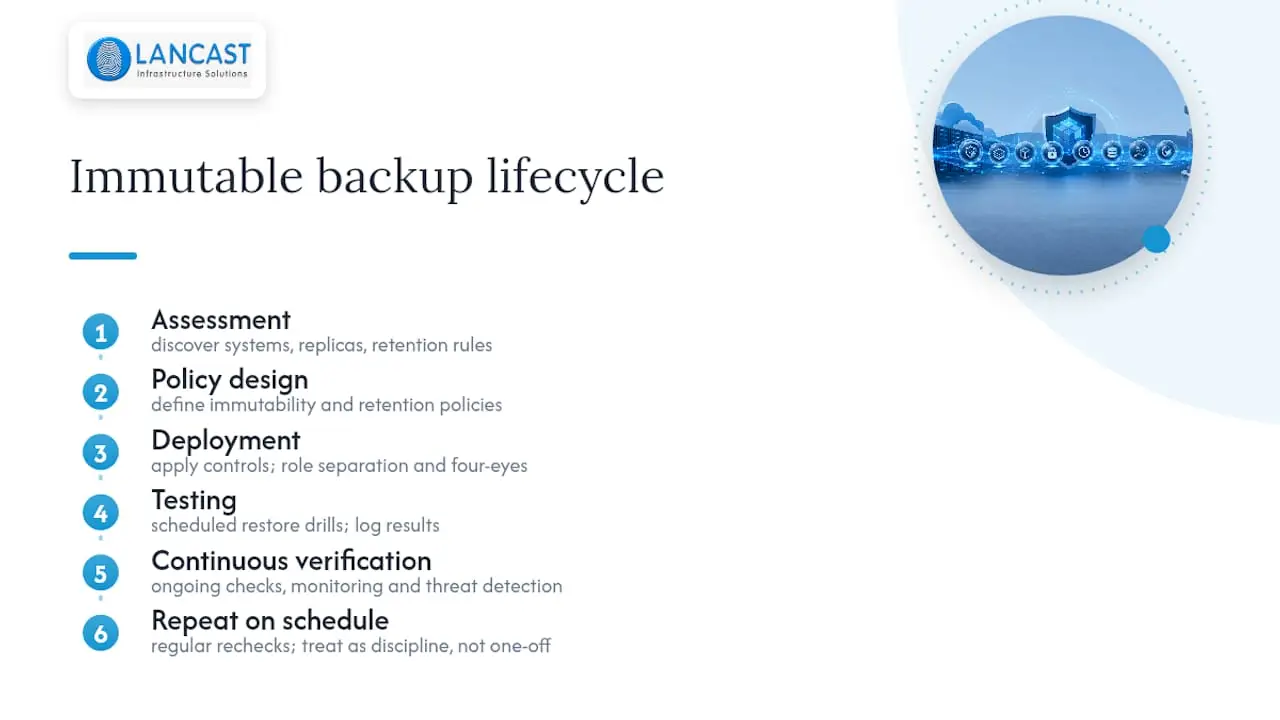
A structured path typically runs through assessment, then policy design, then deployment, then testing, then continuous verification, repeated on a schedule rather than treated as a one-off project. Role separation and four-eyes approval need to be built into day-to-day operations, not documented once and left to erode. Restore drills need to happen on a calendar, with results logged, so that “we have immutable backups” is a demonstrated fact rather than an assumption sitting on a slide.
LANCAST’s approach to data recovery and offsite storage reflects this lifecycle in practice, treating recoverability checks as an ongoing operational discipline rather than a launch-day checkbox. Continuous monitoring and early threat detection, delivered through LANCAST’s security services, sit alongside backup verification because the two disciplines protect the same outcome from different directions.
Immutability is necessary, but it is not the whole strategy
The organisations that get burned despite having immutable backups are almost never the ones with a bad immutability setting. They are the ones who treated immutability as the finish line rather than one layer in a wider resilience plan. A perfectly locked backup that has never been restored is not protection, it is an assumption waiting to be tested at the worst possible time.
Pair immutability with network isolation, so a compromised endpoint cannot even attempt to reach the backup infrastructure. Pair it with content validation, so you are not immutably preserving data that was already compromised before the backup ran. And pair it with enough restore capacity, tested regularly, that recovery time is a known number rather than a hopeful guess.
If budgets are tight, prioritise in that order: get retention and compliance mode right first, then invest in restore testing, then extend into air-gapped copies. Each layer buys real protection, but only the combination gives you resilience.
— Carl
How LANCAST supports immutable backup projects
Deciding on a retention window is one thing. Enforcing it correctly across every repository, replica and access role, then proving it works under a restore drill, is where most in-house teams run short on time rather than knowledge.
LANCAST’s Backup and Data Recovery services cover assessment, policy design and deployment, with ongoing monitoring built into our managed support plans rather than sold as a separate afterthought. Clients working with us through our Silver, Gold or Platinum Support plans receive scheduled recoverability checks and clear reporting on retention status, so immutability stays a verified fact rather than a configuration nobody has looked at since it was switched on. As an HP Amplify Partner and Microsoft Cloud Service Provider, we integrate backup policy work into the wider infrastructure we already manage for clients, rather than treating it as an isolated project.
If you want a clear view of where your current backup strategy stands, get in touch with LANCAST to arrange an assessment.
Sources
- Immutable storage overview – Azure Storage | Microsoft Learn
- StopRansomware guide | CISA
- Backup Repositories – Veeam Backup & Replication What’s New
- Immutable Storage: Real immutability vs. marketing claims (Scality/SOLVED)
FAQ
What is an immutable backup?
An immutable backup is a copy of your data that cannot be modified or deleted for a defined retention period, even by an administrator. This prevents attackers or accidental actions from destroying your recovery option during that window, as outlined in CISA’s ransomware guidance.
What is the key difference between a mutable and an immutable backup?
A mutable backup can be altered or deleted by anyone with sufficient access, which means it offers no protection if that access is compromised. An immutable backup locks the data against change for its retention window, and in compliance mode that lock applies even to a root account, unlike the governance mode described in vendor guidance from Scality’s immutability explainer.
What are the four types of backups?
Definitions vary slightly between vendors, but the categories most commonly referenced are full, incremental, differential and synthetic full backups, each differing in how much data is captured and how quickly a restore can be assembled. None of these types is inherently immutable; immutability is a policy applied on top of whichever backup type you choose.
Can Veeam do immutable backups?
Yes, Veeam supports immutability through hardened repositories, object storage integrations and governance-mode retention locks, as documented in Veeam’s user guide on backup immutability. Once enabled, deletions are blocked on that repository until the configured retention period expires.