

A tiny office with a handful of laptops and a printer rarely needs more than an unmanaged switch, while any business running VoIP phones, security cameras or guest Wi-Fi alongside staff traffic almost always benefits from a managed switch. The difference comes down to control: managed hardware lets you segment, prioritise and monitor traffic; unmanaged hardware simply connects devices. The sections below walk through the trade-offs and end with a checklist you can use to decide.
TL;DR:
- Unmanaged switches are suitable for small offices with minimal traffic types, while managed switches are necessary for networks with VoIP, cameras, or guest Wi-Fi.
- Managed switches provide features like VLANs, QoS, and remote monitoring, but come at a higher initial cost and require setup and occasional management.
- For growing SMBs, a smart-managed switch offers a balance of segmentation, prioritization, and affordability without the complexity of full enterprise solutions.
- Proper network security depends on correct VLAN configuration and access controls, not just purchasing a managed switch.
- Ongoing management and configuration are crucial for security and performance, with professional support often reducing operational overhead.
Table of Contents
- What unmanaged and managed switches actually do
- Pros and cons: cost, complexity, visibility and maintenance
- Which environments suit each type of switch
- A decision checklist for choosing your switch
- Network segmentation, misconfiguration and how to reduce risk
- How we approach switch recommendations
- Let us take switch management off your plate
- FAQ
- Sources
What unmanaged and managed switches actually do
An unmanaged switch is plug-and-play. You connect devices to its ports and it forwards traffic between them with no configuration, no login screen and no ongoing attention required. Cisco’s own guidance on selecting switches for small offices describes unmanaged switches as ideal where budget is tight and no IT staff are on hand to manage the network, since they need no ongoing maintenance once installed.
A managed switch gives you a console, typically a web interface or command line, where you can shape how traffic moves. The features that matter most in practice:
- VLANs split one physical network into separate logical ones, so guest Wi-Fi, phones and staff devices never mix traffic.
- QoS (Quality of Service) prioritises time-sensitive traffic, such as VoIP calls, ahead of bulk file transfers.
- SNMP and telemetry let you monitor port status, traffic volume and errors remotely instead of walking over to check a cable.
- Port mirroring copies traffic from one port to another for diagnostics or security monitoring.
- PoE management lets you control power delivery to cameras, access points and phones port by port, including scheduled reboots.
Between these two sits the smart (or web-managed) switch: a cut-down managed device offering VLANs and basic QoS through a simplified interface, without the full routing and scripting depth of an enterprise Layer 3 switch. For many small offices, that middle tier is plenty.
Pros and cons: cost, complexity, visibility and maintenance
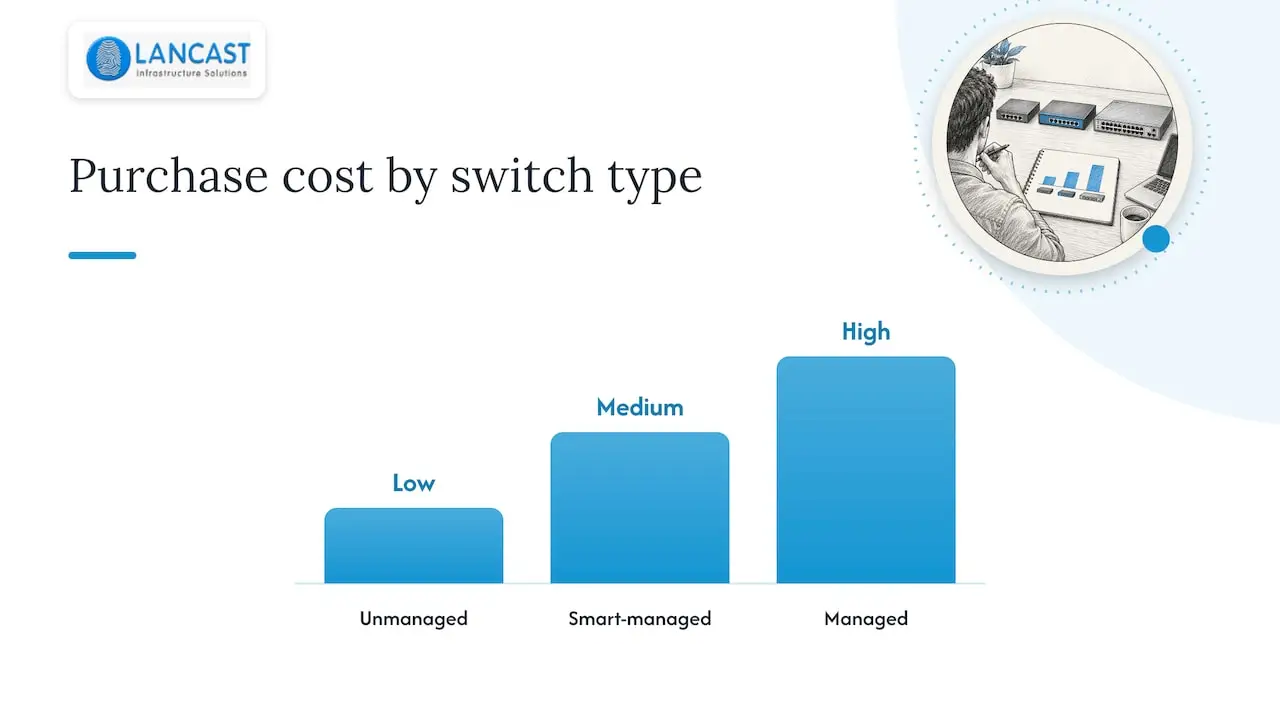
Unmanaged switches win on upfront cost and simplicity. There is nothing to configure, nothing to patch and nothing that can be misconfigured, which suits a setup with no segmentation or prioritisation needs.
Managed switches cost more initially and demand some administrative time, whether from in-house IT or an outsourced provider. What you get in return is visibility: when a port drops, a managed switch tells you which one and why, rather than leaving you to trace cables under desks.
- Unmanaged: lower purchase price, zero configuration, no ongoing management cost.
- Managed: higher purchase price, requires setup and occasional review, but cuts troubleshooting time significantly.
- Smart-managed: a middle cost tier that adds VLANs and QoS without the full administrative overhead of enterprise Layer 3 switching.
Pro Tip: If your current network has never needed a password to access a switch, you almost certainly have unmanaged hardware, and that is fine until you add a second type of traffic that needs separating.
Which environments suit each type of switch
Matching the switch to the environment avoids both overspending and under-provisioning:
- Tiny or home office with a small number of devices and no VoIP or cameras: an unmanaged switch with enough ports, and PoE if you run an access point, covers it comfortably.
- Growing SMB adding VoIP handsets, security cameras or a guest Wi-Fi network: this is where VLANs and QoS start to matter, since voice traffic needs priority over a guest downloading large files on the same cabling.
- Multi-site or remote-managed business: a managed switch with remote access lets an administrator or outsourced IT provider check status and make changes without a site visit, which matters once you have more than one office.
- Undecided or budget-conscious growth: a smart-managed switch is the pragmatic upgrade path, giving you segmentation and prioritisation now with room to move to full Layer 3 management later without replacing the hardware twice.
The pattern across all four is straightforward: the more types of traffic sharing one network, and the more sites or remote hands involved, the stronger the case for management features.
A decision checklist for choosing your switch
Work through this in order before you buy or request a quote:
- Count your devices and services. A small number of devices with no VoIP or cameras usually points to unmanaged; if there are more devices or mixed traffic types, look at smart or fully managed.
- Decide on segmentation and QoS needs. If voice, video or guest access shares the same cabling as staff work, VLANs and QoS stop being optional.
- Specify management and monitoring expectations. Decide whether you or a support provider need remote access, SNMP alerts and port-level diagnostics.
- Check PoE and port-count requirements, including headroom for the next 12 to 24 months of growth.
- Budget for ongoing management, not just the purchase price. This is where outsourced managed services often cost less than building in-house capacity.
- When still undecided, choose smart-managed. It covers most SMB segmentation and prioritisation needs without the complexity or price of a full enterprise switch.
Network segmentation, misconfiguration and how to reduce risk
Buying a managed switch does not make a network secure by itself. The NCSC’s network security fundamentals guidance recommends segregating networks and using VLANs and access controls to isolate critical systems, calling this one of the most effective ways to limit an attacker’s ability to move laterally once inside. That protection only exists when VLANs are designed and configured correctly, not simply switched on.
Common mistakes include leaving default administrator credentials in place, exposing the management interface to the general network, and misconfiguring VLAN trunking in a way that allows VLAN hopping between segments that were meant to stay isolated.
NCSC guidance on operational technology recommends that static controls such as ACLs and route filtering sit between network zones as a minimum effective measure, alongside restricting management access to dedicated, trusted devices rather than general-purpose workstations.
Practical mitigations worth building into any managed deployment:
- Restrict management-plane access to a dedicated device or privileged workstation, never a general staff laptop.
- Change default credentials immediately and disable unused management protocols.
- Keep firmware current and apply a change-control process before altering VLAN or trunk settings.
How we approach switch recommendations
When we assess a client’s network, we start by inventorying every connected device, voice or video service, and realistic growth over the next year or two, rather than assuming more hardware automatically means better security. That inventory tells us whether smart-managed segmentation covers the need or whether a fully managed, monitored setup is justified. Our managed services team then handles the configuration, monitoring and firmware upkeep that keep a managed switch delivering the visibility it was bought for.
— Carl
Let us take switch management off your plate
If specifying, configuring and monitoring a managed switch sounds like more than your team wants to take on, our managed services cover proactive monitoring, remote support and ongoing maintenance for your network hardware.

We can assess your current setup and recommend the right switch type and configuration for your device count, services and growth plans. Get in touch for a tailored network assessment through our managed-services page.
FAQ
What’s better, a managed or unmanaged switch?
Neither is universally better: an unmanaged switch suits a small, simple network with one type of traffic, while a managed switch suits any setup mixing VoIP, cameras, guest Wi-Fi or multiple sites. The right choice depends on how many devices and services you run, not on which switch is more advanced.
Do I really need a managed switch?
You need one once your network carries more than one type of traffic that should be kept apart, such as voice alongside guest Wi-Fi, or once you need remote visibility into port status and errors. A small office with a small number of simple devices and no VoIP can usually run on unmanaged hardware.
Can you run a managed switch as unmanaged?
Yes, most managed switches work out of the box with default settings and no VLANs configured, behaving like an unmanaged switch until you log in and set them up. That said, paying for management features you never configure means losing the segmentation and monitoring benefits that justified the extra cost.
What are the downsides of using unmanaged switches?
Unmanaged switches offer no way to segment traffic, prioritise voice or video, or remotely check port status, so troubleshooting takes longer and every fault requires a site visit. They also provide no VLAN-based security segmentation, which matters once a network carries anything sensitive.